
By IT Defined Team | April 25, 2026
A real-world tutorial for building a production CI/CD pipeline on AWS — push code to GitHub, build with Actions, deploy to EKS via Helm. With OIDC, no static keys.
What we're building (and why this is the pipeline most companies actually want)
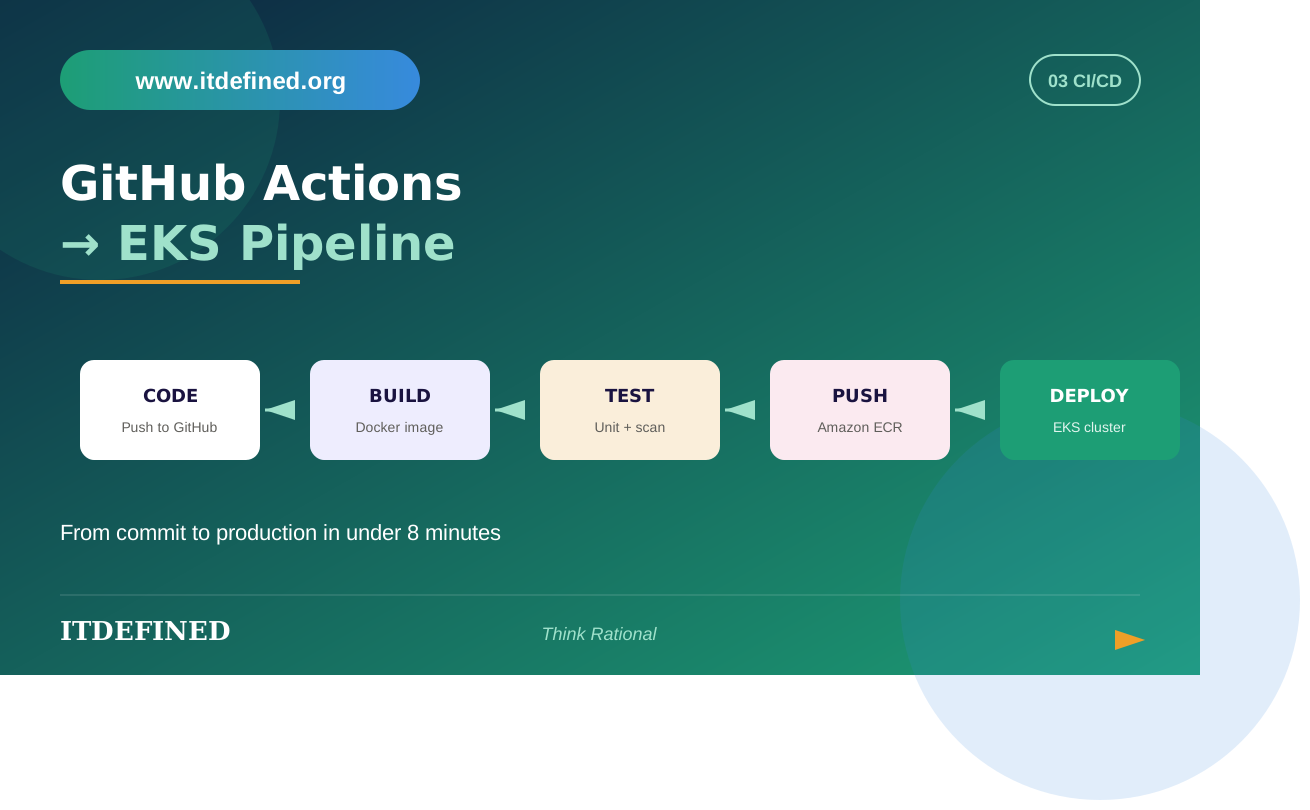
I want to be specific. This isn't a hello-world tutorial. By the end of this post you'll have a working CI/CD pipeline that does this:
- Developer pushes code to a feature branch on GitHub
- GitHub Actions runs unit tests
- On merge to main, Actions builds a Docker image, tags it with the git SHA, pushes to ECR
- Actions updates the Helm chart with the new image tag and deploys to EKS
- Deploy uses ArgoCD or direct Helm — I'll show both
- Smoke tests run, Slack notification fires
- Authentication is via OIDC federation, no long-lived AWS keys anywhere
This is roughly the pipeline I see at most product companies in Bangalore right now. If you can build this end-to-end and explain every part of it, you'll do well in interviews.
Prerequisites
You need an EKS cluster running. If you don't have one, that's a separate post. Briefly: use the terraform-aws-modules/eks/aws module, give it a managed node group with 2 t3.medium nodes, and make sure you have kubectl access.
You also need: an AWS account, a GitHub repo (a simple Node.js or Python web app is fine), Docker installed locally, kubectl and Helm installed locally, and an IAM admin user for setting up OIDC trust (you won't use this user for the pipeline itself).
Estimated AWS cost while you're building this: around $5-10 if you do it in a day. EKS control plane is $0.10/hour, so destroy the cluster when you're done practicing.
Step 1: Set up OIDC trust between GitHub and AWS
This is the part most tutorials skip or do wrong. Don't put AWS access keys as GitHub secrets. It's 2026, we have better options.
OIDC federation lets GitHub Actions assume an IAM role temporarily, without any long-lived credentials. Setup is a one-time thing per AWS account.
First, create the OIDC provider in IAM. You can do this via Terraform:
resource "aws_iam_openid_connect_provider" "github" {
url = "https://token.actions.githubusercontent.com"
client_id_list = ["sts.amazonaws.com"]
thumbprint_list = ["6938fd4d98bab03faadb97b34396831e3780aea1"]
}Then create an IAM role that GitHub Actions can assume. The trust policy is the important part:
{"Version": "2012-10-17",
"Statement": [{
"Effect": "Allow",
"Principal": { "Federated": "arn:aws:iam::ACCOUNT_ID:oidc-provider/token.actions.githubusercontent.com" },
"Action": "sts:AssumeRoleWithWebIdentity",
"Condition": {
"StringEquals": {
"token.actions.githubusercontent.com:aud": "sts.amazonaws.com"
},"StringLike": {
"token.actions.githubusercontent.com:sub": "repo:YOUR_ORG/YOUR_REPO:*"
}
}
}]
}
The StringLike condition is crucial. It restricts the role to one specific repo. Without this, anyone with a GitHub Actions workflow could assume your role. People have been pwned by this.
Attach a policy to this role that allows ECR push, EKS describe, and any other actions your pipeline needs. Start narrow, add as needed.
Step 2: Write the Dockerfile
Production-grade Dockerfile. No FROM ubuntu:latest, please.
FROM node:20-alpine AS builder
WORKDIR /app
COPY package*.json ./
RUN npm ci --only=production
COPY . .
RUN npm run build
FROM node:20-alpine
RUN addgroup -S app && adduser -S app -G app
WORKDIR /app
COPY --from=builder --chown=app:app /app/dist ./dist
COPY --from=builder --chown=app:app /app/node_modules ./node_modules
USER app
EXPOSE 3000
CMD ["node", "dist/server.js"]
Multi-stage build. Non-root user. Minimal alpine base. This will be 150MB instead of 1.2GB. Recruiters notice when candidates show this — most freshers' Dockerfiles are 800MB monstrosities.
Step 3: The Helm chart
Don't write raw Kubernetes YAML for production deploys. Use Helm. It lets you template values for different environments.
Generate a chart with helm create myapp. Then edit values.yaml:
image:
repository: ACCOUNT_ID.dkr.ecr.ap-south-1.amazonaws.com/myapp
tag: "placeholder"
pullPolicy: IfNotPresent

resources:
requests:
cpu: 100m
memory: 128Mi
limits:
cpu: 500m
memory: 512Mi

autoscaling:
enabled: true
minReplicas: 2
maxReplicas: 10
targetCPUUtilizationPercentage: 70
Always set resource requests and limits. Forgetting this is how you blow up an EKS cluster.
Step 4: The GitHub Actions workflow
Here's the meat of it. Save as .github/workflows/deploy.yml:
name: Build and Deploy
on:
push:
branches: [main]

permissions:
id-token: write   # required for OIDC
contents: read

jobs:
test:
runs-on: ubuntu-latest
steps:
- uses: actions/checkout@v4
- uses: actions/setup-node@v4
with:
node-version: '20'
- run: npm ci
- run: npm test

build-and-deploy:
needs: test
runs-on: ubuntu-latest
steps:
- uses: actions/checkout@v4

- name: Configure AWS credentials
uses: aws-actions/configure-aws-credentials@v4
with:
role-to-assume: arn:aws:iam::ACCOUNT_ID:role/github-actions-role
aws-region: ap-south-1

- name: Login to ECR
uses: aws-actions/amazon-ecr-login@v2

- name: Build and push image
env:
REGISTRY: ${{ steps.login-ecr.outputs.registry }}
IMAGE_TAG: ${{ github.sha }}
run: |
docker build -t $REGISTRY/myapp:$IMAGE_TAG .
docker push $REGISTRY/myapp:$IMAGE_TAG

- name: Update kubeconfig
run: aws eks update-kubeconfig --region ap-south-1 --name my-cluster

- name: Deploy with Helm
run: |
helm upgrade --install myapp ./charts/myapp \
--namespace production \
--set image.tag=${{ github.sha }} \
--wait --timeout 5m

- name: Smoke test
run: | ENDPOINT=$(kubectl get svc myapp -n production -o jsonpath='{.status.loadBalancer.ingress[0].hostname}')
curl -f http://$ENDPOINT/health || exit 1

- name: Notify Slack
if: always()
uses: slackapi/slack-github-action@v1
with:
payload: |
{"text": "Deploy ${{ job.status }}: ${{ github.sha }}"}
env:
SLACK_WEBHOOK_URL: ${{ secrets.SLACK_WEBHOOK }}
Step 5: Add ArgoCD if you want GitOps (optional but recommended)
The pipeline above does push-based deploys. Actions runs helm upgrade directly. This works, but the modern alternative is GitOps — Actions just updates a values.yaml in a separate config repo, and ArgoCD pulls that change and applies it.
Why GitOps? Better audit trail, easier rollbacks (just revert the git commit), drift detection, and your CI doesn't need cluster credentials. The cluster pulls; CI doesn't push.
Setup is a separate post but the high-level: install ArgoCD on EKS via Helm, point it at your config repo, change your Actions workflow's last step to commit a values.yaml change instead of running helm. ArgoCD does the rest.
Common things that break (and how to fix them)
OIDC role assumption fails with "Not authorized to perform sts:AssumeRoleWithWebIdentity." Almost always the trust policy condition. Double-check the repo path matches exactly.
Image pulls fail in EKS with "ImagePullBackOff." Probably the EKS node IAM role doesn't have ecr:GetAuthorizationToken. Add the AmazonEC2ContainerRegistryReadOnly managed policy.
Helm timeout on first deploy. Usually means your pod is stuck Pending or CrashLooping. Check kubectl get pods -n production then describe the pod.Smoke test fails because the LoadBalancer hasn't come up yet. Add a sleep, or use kubectl wait --for=condition=ready.
What this teaches you for interviews
If you build this pipeline yourself and can explain every line, you cover roughly 60% of typical DevOps interview questions:
- Why OIDC instead of access keys
- Multi-stage Docker builds
- Helm vs raw kubectl
- GitHub Actions vs Jenkins
- Push-based vs pull-based deploys
- How to handle secrets in CI
- Container security basics
Honestly, most candidates I see can't build this end-to-end. If you can, you're already ahead.
Source code
We maintain a reference repo for our students at IT Defined with this exact pipeline as a starting point. If you want a guided path through this with personalized feedback on your code, our AWS DevOps program covers this in week 8 with hands-on labs and live debugging.
Frequently asked questions
Why GitHub Actions and not Jenkins?
Honestly, in 2026, GitHub Actions has overtaken Jenkins for new projects. It's hosted, free for public repos, and the workflow YAML is easier to maintain than Jenkinsfiles. Jenkins is still common in legacy codebases.
Can I use this pipeline for non-Node.js apps?
Yes. The structure is identical for Python, Java, Go. Just change the Dockerfile and the test step.
How do I handle database migrations in this pipeline?
Run them as a Kubernetes Job before the deployment, or use a separate migration step in Actions before the helm upgrade. Don't bundle migrations into your app's startup — that's how you get cascading failures.
What about blue-green or canary deployments?
Use Argo Rollouts on top of ArgoCD. It's a separate setup but gives you proper progressive delivery. Worth learning once you have the basics down.
About IT Defined
IT Defined is a software training institute in Whitefield, Bangalore, offering hands-on programs in AWS DevOps, Full-Stack MERN, Python, and Cybersecurity. We've trained over 2,000 students with live projects, mock interviews, and placement support.
Visit: itdefined.org | Phone: +91 6363730986 | Email: info@itdefined.org